
Remember people you meet at conferences (without a second brain dump later)
TL;DR: At a conference you don't need a bigger contact list. You need a private memory of what that person just said — and clear follow-ups on what you promised and what they promised. PplBrief is how you remember the people you just met at a conference — what they said, what you promised, and what to follow up on — privately on your iPhone.
Key takeaways
- Capture right after the chat (voice between sessions works well), not in a dump at midnight.
- Follow-ups go both ways: what you owe them and what they owe you.
- People don't know they're in it — it's your companion, not a shared network.
- It's not a badge-scanner CRM, outreach sequencer, or LinkedIn automation tool.
Thirty seconds after the hallway chat
You're walking to the next session. You've just met someone useful. Name, company, where they live, kids' ages, "send me that intro," "I'll share the deck." It felt like a real conversation.
Open Notes and you get a paragraph. Open a voice memo and you get ten minutes of audio you'll never re-listen to. By dinner the sharp bits are gone. By the flight home you're left with a badge photo and a vague sense you owed someone something.
That's the job: remember people at a conference while the details are still warm — then follow through after the event without reconstructing the week from scraps.

Capture the conversation before the next session starts.
The job: capture → structure → follow through
Conference networking fails less because you meet the wrong people and more because the system after the chat is weak.
- Capture while context is fresh — between sessions, in the lobby, on the train.
- Extract people, context, and promises from that dump so you're not hunting through a wall of text later.
- Follow through when you're home: the intros you offered, the decks they promised, the coffee you both meant to book.
A networking notes app only helps if it covers all three. A contact list alone covers none of the promises.
How PplBrief fits at an event
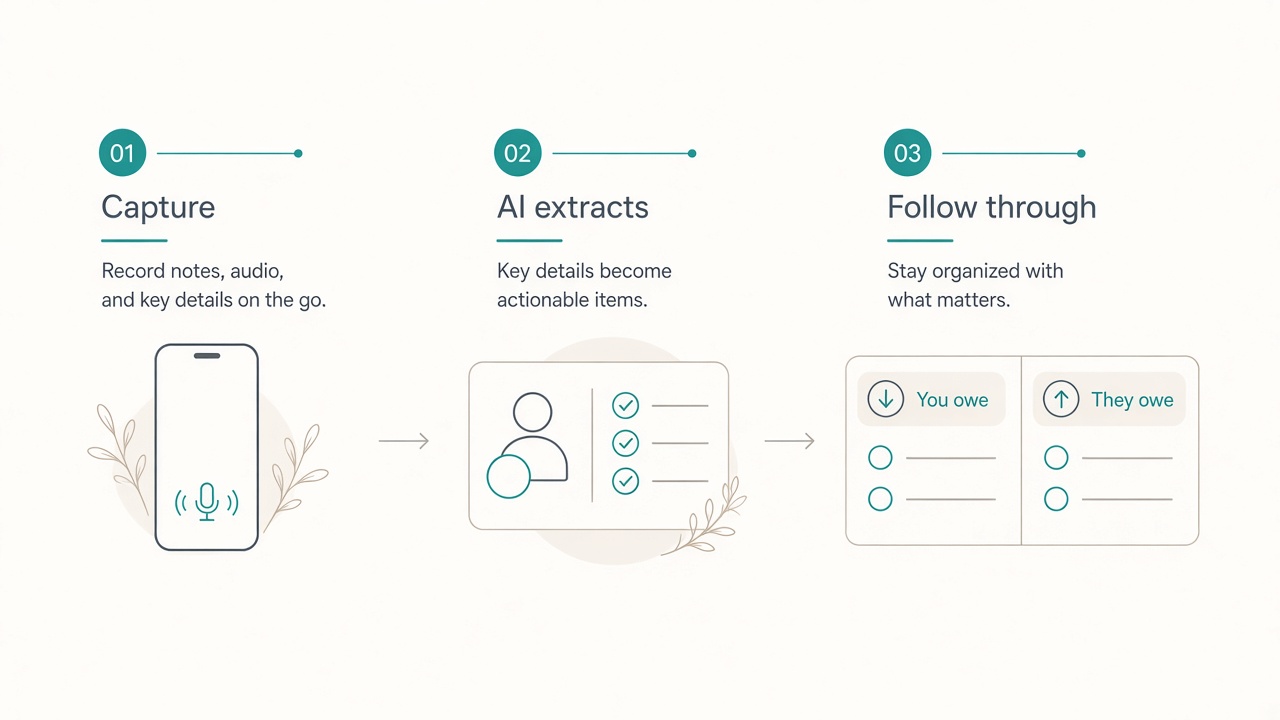
1. Capture on iPhone
Voice is often enough between sessions: talk through what just happened while you're still in the corridor. Typing works too if you prefer quiet. The point is the moment — right after you meet someone — not a heroic recap at midnight.
2. AI turns the note into people, context, and promises
Instead of one blob, you get a structured memory of the person and the conversation: who they are, what matters, and what was agreed.
3. Follow-ups both ways when you're home
Conference follow-up isn't only "send them a note." It's also the intro you said you'd make, the article you said you'd send, and the thing they said they'd share. PplBrief keeps both sides visible so balls don't quietly drop. It's the same habit as tracking follow-ups in both directions after any meeting.
Privacy stays with you. People don't know they're in PplBrief. It's a private companion on your phone — not a network, not a feed, not something your booth team shares. (See privacy on the site.)
Badge CRM vs notes vs PplBrief
| Badge / lead CRM | Notes / voice memo | PplBrief | |
|---|---|---|---|
| Primary object | Lead / scan | Blob of text or audio | Person + conversation |
| During the event | Collect contacts | Dump everything | Capture the talk |
| After the event | Outreach cadence | Re-listen / re-read | Clear promises both ways |
| Privacy | Often shared / team | Private but unstructured | Private companion |
If your goal is booth lead volume for a sales pipeline, use a lead tool. If your goal is remembering the people you just met — and doing what you said — use something built around the conversation.
For the wider product framing, see What is PplBrief? and PplBrief vs a personal CRM. (If you searched for PeopleBrief and meant HR software, that's a different product — this page is about PplBrief, the private companion for conversation memory and promise tracking.)
When this use case is a fit
- 1:1s and hallway chats at conferences and industry events
- Meetups, offsites, and "coffee after the talk"
- Anyone who meets many people in a short window and hates dropping balls
- People who'd rather be reliable than well-networked
When it's not
- You only need email collection for a booth or a sales CRM → use a badge / lead tool
- You want automated LinkedIn drip or an outreach sequencer → not PplBrief
- You're building a shared team contact database → that's CRM territory, not a private companion
FAQ
- Do people know they're in PplBrief?
- No. It's your private companion. There's no shared network and no notification to the other person.
- Can I use voice between sessions?
- Yes. Voice capture on iPhone is a natural fit in the gap between talks — speak while the conversation is still clear, then move on.
- Does PplBrief replace LinkedIn?
- No. LinkedIn is where public profiles and outreach live. PplBrief is where you keep what was actually said and promised — privately — so follow-ups don't depend on memory alone.
- What about after the conference?
- That's when follow-through matters. Review the people and promises you captured, clear what you owe, and nudge what they offered — without reconstructing the week from Notes and badge photos.
- Is capture iPhone-only?
- Capture is built around the iPhone (including voice). You can also use the web to review and follow up once you're back at a desk. Start with the App Store download.
- Is this a personal CRM for events?
- Only in the light sense of remembering people and follow-ups. It is not a sales CRM, badge scanner, or outreach tool. The centre is the conversation and the promises — not a pipeline.
- What if I already take notes?
- Keep taking them. PplBrief helps when a paragraph or long voice memo isn't enough: you need people, context, and bidirectional follow-ups after the event, not another file you'll never open.
Get it for your next event
Download PplBrief for iPhone — capture the conversation before the next session starts.
Remember what they said. Do what you said.